

How to Add Funds to Your Shark Exchange Futures Wallet (INR → Futures)
Step-by-step with screenshots: deposit rupees on Shark Exchange and move them to your Futures wallet so AlgoPulse can trade — no USDT to buy. Takes about a minute.
AlgoPulse can only trade with money that is inside your Shark Futures Wallet. Money sitting in your INR Wallet is invisible to your strategy — which is why a freshly funded account can still say “Insufficient funds”. Moving it across takes about a minute in the Shark app.
Your two Shark wallets
- INR Wallet — the rupees you deposit by UPI or IMPS land here.
- Futures Wallet — the only wallet AlgoPulse trades from.
Step 1 — Deposit rupees
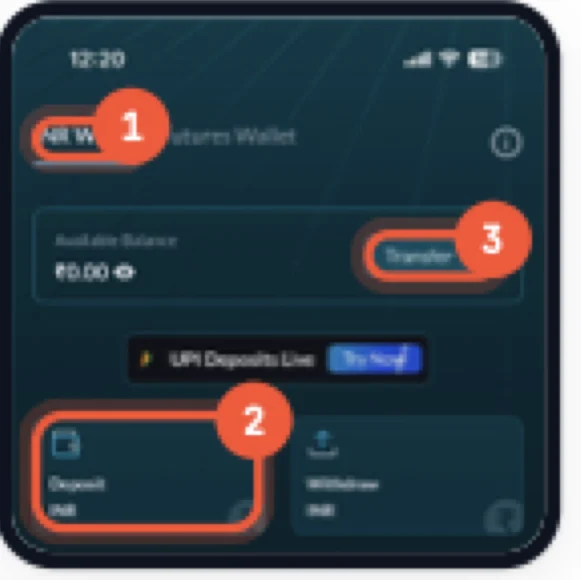
Path: Funds → INR Wallet → Deposit INR
Open the Funds tab in the bottom bar, stay on INR Wallet and tap Deposit INR. Pay by UPI or IMPS. Deposits are instant and free, and show up under Available Balance.
Step 2 — Move the money to Futures
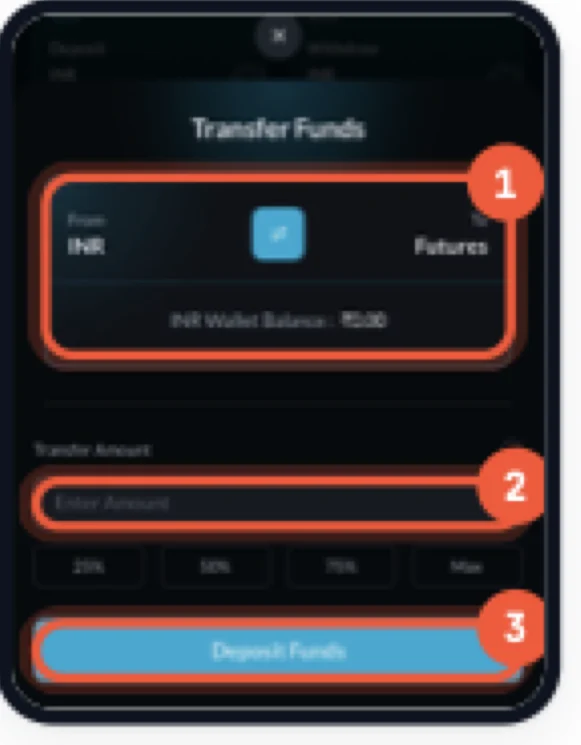
Path: INR Wallet → Transfer → Deposit Funds
Tap Transfer on the INR Wallet card. The sheet should read From INR and To Futures — if it is the other way round, tap the blue swap button in the middle. Type an amount, or tap 25%, 50%, 75% or Max, then tap Deposit Funds. The money arrives straight away.
Step 3 — Check the balance arrived
Path: Funds → Futures Wallet
Switch to the Futures Wallet tab. Total Balance should now show what you moved. That is the money AlgoPulse can trade with.
Then connect Shark and deploy
Go to AlgoPulse → Brokers → Add Broker → Shark Exchange and paste an API key with Trading turned on and Withdrawals off. AlgoPulse reads Shark's minimum order sizes live and warns you in the deploy dialog if your trade would be too small.
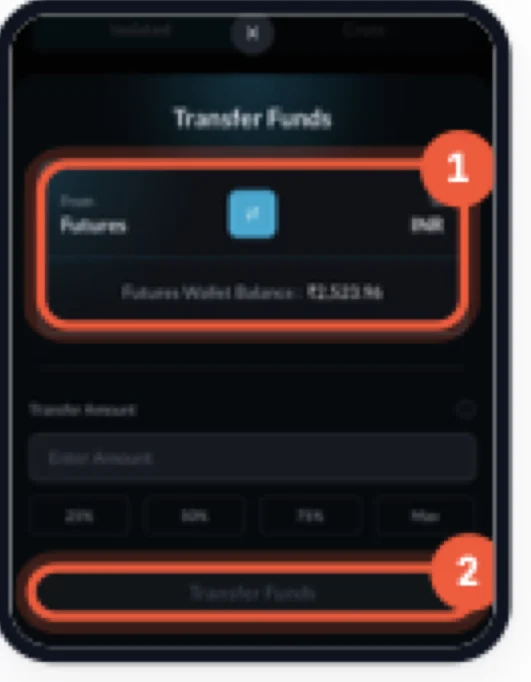
Moving money back
On the Futures Wallet tab, tap Transfer and use the swap button so it reads From Futures and To INR. Enter the amount and tap Transfer Funds.
Common problems
AlgoPulse says “Insufficient funds”
Your Futures Wallet is empty, or the money is still in your INR Wallet. Repeat step 2.
The Deposit Funds button does nothing
Enter an amount first. It must be more than zero and no more than the balance shown in the sheet.
AlgoPulse can't connect to Shark
Check the API key has Trading permission, and that the whitelisted IP is 80.225.249.52, not your own.
I can't move all my money back
Margin in open positions is locked. Stop the strategy and close the positions, then transfer.
Ready to try it yourself?
AlgoPulse is free, no credit card, no subscription. Connect your broker and deploy a strategy in 15 minutes.
Get started free